did u ever read so hard u accidentally wrote?

Owning a production Postgres database is never boring.

The other day, I’m looking for trouble (as I am wont to do), and I notice this weird curve in the production database metrics:

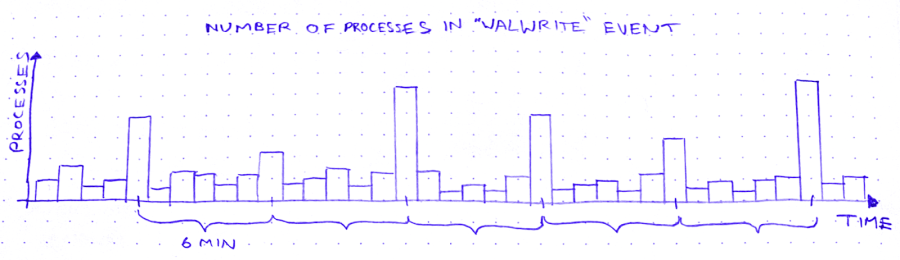
So we’ve got these spikes in WALWrite: the number of processes waiting to write to the write-ahead log (or “WAL”). The write-ahead log is written serially, so sometimes there’s contention for the mutex that lets you write to it. A queue forms.

But why does WALWrite spike periodically, every 6 minutes? Is this some cron job run amok? (*/6 * * * *? But then they’d only be 4 minutes apart at the hour boundaries…) Does a customer do some API request that updates a ton of records? Do I need to worry about this getting worse?

So I zoom out to see when the WALWrite spikes started:
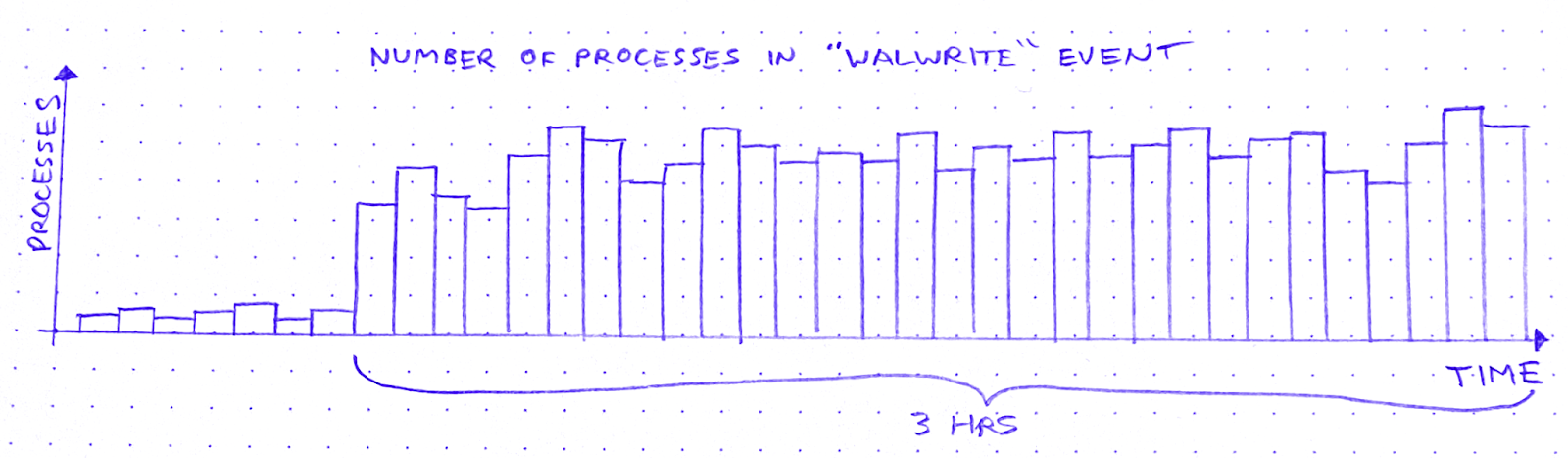
It started about 3 hours ago. Okay: what else started about 3 hours ago?

I scroll around looking at the database graphs. After about 15 minutes of highly scientific squinting and head-tilting, I’ve got two more graphs on my screen. The first is “Max transaction duration.” That is: the age of the oldest open transaction.

This is definitely related. It shares that 6-minute period, and the sawtooth pattern also started 3 hours ago. Great.

After a bit of digging and a brief Slack conversation, I know the reason for this sawtooth pattern. There’s an ongoing backfill into BigQuery via Datastream. As far as I can tell, what a Datastream backfill does, is it starts a transaction and then uses a cursor to page through the rows of the table. Something like:

BEGIN;
DECLARE curs CURSOR FOR SELECT * FROM table OFFSET ?;
OPEN curs;
FETCH FORWARD ? FROM curs INTO ?;
/* ~6 minutes later */
ROLLBACK;

After about 6 minutes the transaction closes and a new transaction begins, with a new offset. Repeat until table is backfilled.

The other new graph is “pages dirtied” by a particular query:

Now I don’t know what “pages dirtied” means. I look up “dirty page” on Urban Dictionary, but it’s a miss. So I resort to Googling around for a while. I eventually land on this Cybertec blog post (there’s always a Cybertec post. God bless ’em), which demystifies shared buffers for me.

When Postgres needs to write to a page, it:

  1. Writes the change to the WAL
  2. Writes the change to a buffer, marking the buffer as dirty in the process

Then a process called the background writer comes along at some point later and writes the dirty buffer to disk. Great! So that’s what “pages dirtied” means.

Except – and this is wild – the particular query whose “pages dirtied” rate is shown in the graph above is, SELECT * FROM foo WHERE id = ?. Yes you read that right: SELECT. Now I’m no SQL expert, but I thought SELECT (absent a FOR clause) was a read-only operation. Right? So what’s this about writing?

In fact, come to think of it, the sawtooth workload from before – the Datastream backfill – was also a read-only workload. So, good news and bad news. The good news is I’ve identified 2 workloads that correlate closely to the WALWrite spikes I’m trying to explain. The bad news is: they’re both read-only workloads.

At this point I need a walk, so I put on my hat and coat and I stomp through slush to the coffee shop. I feel flummoxed, and I try to think about literally anything else – Cyberpunk 2077… the French Revolution… what I’m gonna make for dinner. Anything but Postgres.

So, a few minutes minutes later, I’m waiting in line at a coffee shop, reading Postgres StackOverflow posts on my phone. And I find this one. Cybertec again! These guys are everywhere. What I learn from this post is revelatory: SELECT queries in Postgres are not read-only. True, a SELECT can’t modify rows. But it can sure as hell modify tuples!

A tuple is basically a version of a row. When you UPDATE (or DELETE) a row, Postgres doesn’t just update the data in place. It creates a new tuple with the new data and adds that tuple to the heap. It also adds entries to any relevant indexes.

There is no “row” in the heap. There are only tuples. A SELECT query doesn’t just “fetch” a row. It fetches some number of tuples, determines which tuple is visible to the present transaction, and uses that tuple’s data to construct a row.

In order to make that visibility determination, Postgres needs to know, for each tuple fetched, whether the transaction that wrote that tuple has ended. It can determine this by referring to the commit log (pg_clog), but that involves disk reads, so it’s not very fast. Wouldn’t it be great if somehow we could cache the result of that pg_clog lookup so that subsequent queries can skip it?

Enter hint bits. When a SELECT checks pg_clog and determines that the transaction that wrote a tuple is closed, it sets a bit on that tuple. A “hint bit.” This way, subsequent SELECTs that fetch the same tuple won’t have to consult pg_clog.
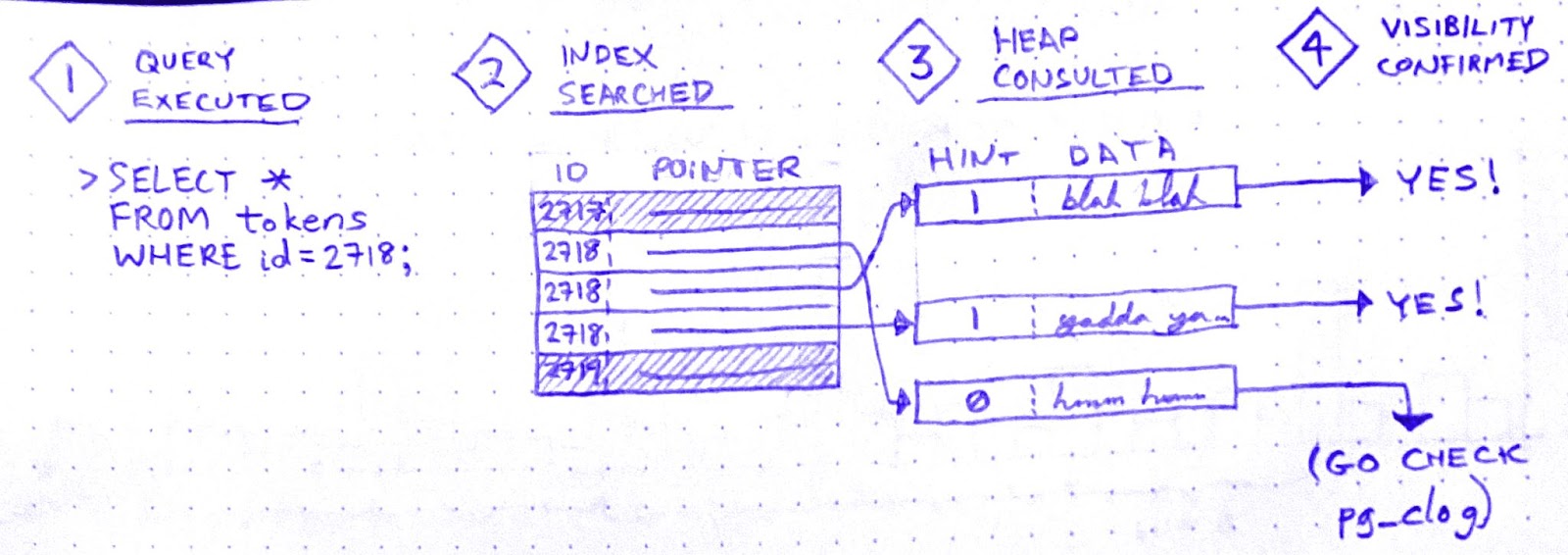
So it’s an optimization. But, if you’ve been paying attention, you now see why SELECTs in Postgres aren’t read-only: Setting a hint bit is a write. It dirties the page.

Aha! I’m starting to get a hypothesis here:

  1. Datastream starts a transaction in order to SELECT * FROM foo
  2. While the Datastream transaction is open, many foo rows are SELECTed and UPDATEd by other, concurrent transactions.
  3. Therefore, while the Datastream transaction is open, many of the concurrent SELECTs on foo must fetch multiple tuples per row. Whenever they do, they encounter tuples written by the Datastream transaction
  4. Datastream ends its transaction.
  5. All subsequent SELECTs that encounter tuples written by the Datastream transaction will now update the hint bits for those tuples after seeing in pg_clog that the transaction is closed.

But it doesn’t quite hang together yet. I still see two major cracks in this hypothesis:

(a) In (3): why has the Datastream transaction created tuples? That’s weird, right?

(b) And in (5): why does updating the hint bits cause contention for WAL writes? (by default, hint bit updates do not trigger a WAL write.)

Let’s do (b) first. That’s easier.

When recovering from a crash, Postgres starts from a checkpoint: a WAL entry representing an instant at which all data is up to date on disk. Then it replays all subsequent WAL changes against the data pages on disk. In order for this to work, the pages on disk must be internally consistent.

How could a page become internally inconsistent, you say? Torn writes. That’s when part of the page is written to disk, but before the next write() call can finish writing the page to disk, the system crashes. If a page on disk is “torn,” crash recovery can’t proceed. That’s why Postgres has a setting called full_page_writes, which is on by default. With full_page_writes on, the first time a page is dirtied after a checkpoint, that page is written in its entirety to the WAL.

This explains why updating hint bits caused a run on the WAL. In fact, when I raise the interval between checkpoints, the WALWrite spikes disappear.

Hooray!

But what about (a)? Why would the Datastream backfill create tuples? If it doesn’t create tuples, this whole hypothesis becomes untenable.

Well, sorry to disappoint you, but I don’t know why – or even whether – the Datastream backfill creates tuples. Perhaps it doesn’t, and my hypothesis is wrong. If you have an alternative hypothesis, please comment!

Ops is like this a lot of the time. Once you get a working fix, you move on to whatever’s the next biggest source of anxiety. Sometimes you never get a fully satisfying “why.” But you can still love the chase.

Is ops a bullshit job?

I recently had the pleasure of reading anthropologist David Graeber’s 2018 book, Bullshit Jobs: A Theory. Graeber defines a bullshit job as,

a form of paid employment that is so completely pointless, unnecessary, or pernicious that even the employee cannot justify its existence even though, as part of the conditions of employment, the employee feels obliged to pretend that this is not the case.

Bullshit Jobs is dotted with harrowing testimonials from all over the corporate sphere. It opens on Kurt, who is employed by a subcontractor of a subcontractor of a subcontractor for the German military. Whenever a soldier needs to move offices, Kurt’s job is to “take [a] rental car, drive [100-500 km] to the barracks, let dispatch know that [he] arrived, fill out a form, unhook the computer, load the computer into a box, seal the box, have a guy from the logistics firm carry the box to the next room, … [unseal] the box, fill out another form, hook up the computer, call dispatch to tell them how long [he] took, get a couple of signatures, take [the] rental car back home, send dispatch a letter with all of the paperwork and then get paid.”

Then there’s Gerte, a receptionist for a publishing company, whose main responsibilities are answering the phone the 1 time a day it rang, keeping the candy dish full of mints, and winding the grandfather clock in the conference room once a week. There’s Tom, who earns £100,000 a year using postproduction trickery to whiten the teeth and highlight the hair of models in television advertisements. From homeowner’s association managers to call center agents to full-time photocopiers of records in the VA, the subjects of this book all report the same grave and inescapable feeling that their work is completely pointless.

Graeber sees the proliferation of bullshit jobs as a moral tragedy. Why do we insist on employing people to do unnecessary work? Work for work’s sake is wanton domination.

I found it easy to identify with many of the people interviewed in Bullshit Jobs. I’ve certainly had jobs that were permeated by bullshit. However, I’ve never worked an entirely bullshit job.

Or so I thought! Until I came to this interview with Pablo, a software developer:

Pablo: Basically, we have two kinds of jobs. One kind involves working on core technologies, solving hard and challenging problems, etc. The other one is taking a bunch of core technologies and applying some duct tape to make them work together. The former is generally seen as useful. The latter is often seen as less useful or even useless, but, in any case, much less gratifying than the first kind. The feeling is probably based on the observation that if core technologies were done properly, there would be little or no need for duct tape.

Wait a minute! That’s my job! Can it be? Is ops a bullshit job?

The duct taper

By “ops,” I designate a whole family of jobs that share the “taking a bunch of core technologies and… mak[ing] them work together” responsibility described by Pablo. These jobs have titles like System Administrator, Web Operations Engineer, Infrastructure Engineer, Performance Engineer, Site Reliability Engineer, Platform Engineer, and DevOps Engineer. Although these jobs vary in focus, they all carry this operational responsibility, which Graeber takes as evidence that these are duct taper jobs.

A “duct taper” is a role that only exists to solve a problem that ought not to exist in the first place. Graeber cites many examples:

  • “I worked as a programmer for a travel company. Some poor person’s job was to receive updated plane timetables via email several times a week and copy them by hand into Excel.”
  • “My job was to transfer information about the state’s oil wells into a different set of notebooks than they were currently in.”
  • “My day consisted of photocopying veterans’ health records for seven and a half hours a day. Workers were told time and again that it was too costly to buy the machines for digitizing.”
  • “I was given one responsibility: watching an in-box that received emails in a certain form from employees in the company asking for tech help, and copy and paste it into a different form.”

These are all very clear cases. But if ops is one of these duct taper jobs, then what’s the corresponding “problem that ought not to exist in the first place?” According to Pablo, it’s the fact that open source technologies are “unfinished,” “lacking quality,” and have “a lot of rough edges.” If, instead, companies were working with finished, high-quality components, then there would be no need for the duct tapers. So the theory goes.

On what grounds can we object to this characterization? Certainly not on the grounds that open source software doesn’t have rough edges. It most certainly does. One could perhaps take issue with the idea that if the core technologies underlying our software stacks were built with paid labor rather than unpaid labor, they’d be more “finished.” But I won’t.

Instead, I want to take aim at a misconception that I think Pablo shares with many, many people in the software industry. Namely, the idea that if a software system is built correctly, it will work. Or, equivalently: if a software system doesn’t work, then it wasn’t built correctly.

Why ops is necessary

If you work in ops, you no doubt recognize this attitude. It’s been described in countless aspects, from the venerable old “throwing releases over the wall” metaphor to the shiny new Platform Engineering book (Fournier & Nowland, 2024):

Operational discipline, by which we mean a focus on carrying out operational practices on a routine basis, is an area that it’s easy for those with an application software development background to overlook (or worse, roll their eyes at). Some folks think the only reason people have to focus so hard on operational practices is that they didn’t build their APIs right in the first place.

… [I]t is difficult to operate a system whose major functionality predominantly comes from someone else’s code – be it an OSS or vendor system, or some other in-house system. This adds a level of complexity in that unknown operational problems (the “unknown unknowns”) are a constant threat, and the only way to manage that threat is with a discipline that seeks to understand and address all anomalies early, before they cause acute pain.

As soon as software leaves the realm of pure abstraction and enters into the service of real-world needs, it ceases to be “just software.” It becomes part of a complex system: one that includes third party platforms, multi-tenant networks, customers, adversaries, laws, and macroeconomic phenomena. The question of whether the software is built correctly may be the overriding consideration in the mind of a software developer, but it’s only a small matter compared to the myriad sociotechnical forces that determine a production system’s behavior.

Ops, in all its forms, seeks to address the challenges brought on by software’s transition from pure abstraction to engine of value. While software developers like Pablo see these challenges as incidental and indicative of shortcomings in the core technologies, they are in fact fundamental and irreducible. They’re a consequence of the ever-present gulf between the developer’s theory and the messy complexity of the world.

Operations entails constant negotiation between these two spheres: the abstract sphere of software, and the much larger, more complex sociotechnical sphere. This negotiation takes many forms:

  • Reorganizing the connections between subsystems
  • Probing the system for unexpected failure modes
  • Building telemetry to monitor the system’s behavior
  • Identifying anomalies and interpreting them
  • Recovering from system failures
  • Learning from system failures in order to improve reliability

Much of this activity looks, to an outside observer, like fixing mistakes in the design of the infrastructure. But that’s only because, when discrepancies between software assumptions and real-world behavior inevitably accumulate, they tend to accumulate along boundaries with the outside world. Which is where ops happens.

Bullshit can take many forms

Now, do I claim that ops jobs are never bullshit jobs? Of course not. There are many ways for an ops job to be partly or entirely bullshit:

  • You can be bad at the job, so that your work produces no value.
  • You can be lazy, and survive by camouflaging your low output against the natural ineffectiveness of a large hierarchical organization.
  • You can be effective at the job, but work for a company that produces no value.
  • You can work on a product that doesn’t have enough traffic to cause significant operational problems.
  • You can get roped into a compliance role.
  • Your work can be so constrained by bureaucratic box-ticking that it loses meaning.
  • You can just feel, in your soul, for reasons you can’t articulate, that your job is bullshit.

But most of these circumstances can apply just as easily to software dev jobs.

Only you can decide whether and to what extent you have a bullshit job. To do this, you must critically evaluate your work, the context of your work, and your feelings about your work. It’s a worthwhile exercise, regardless of where it leads.

Maybe your job is bullshit, maybe not. Just don’t take Pablo’s word for it.

The queueing shell game

When queues break down, they break down spectacularly. Buffer overruns! Out-of-memory crashes! Exponential latency spikes! It’s real ugly. And what’s worse, making the queue bigger never makes the problems go away. It always manages to fill up again.

If 4 of your last 5 incidents were caused by problems with a queue, then it’s natural to want to remove that queue from your architecture. But you can’t. Queues are not just architectural widgets that you can insert into your architecture wherever they’re needed. Queues are spontaneously occurring phenomena, just like a waterfall or a thunderstorm.

A queue will form whenever there are more entities trying to access a resource than the resource can satisfy concurrently. Queues take many different forms:

  • People waiting in line to buy tickets to a play
  • Airplanes sitting at their gates for permission to taxi to the runway
  • The national waiting list for heart transplants
  • Jira tickets in a development team’s backlog
  • I/O operations waiting for write access to a hard disk

Though they are embodied in different ways, these are all queues. A queue is simply what emerges when more people want to use a thing than can simultaneously do so.

Let me illustrate this point by seeing what happens when we try to eliminate queueing from a simple web application.

The queueing shell game

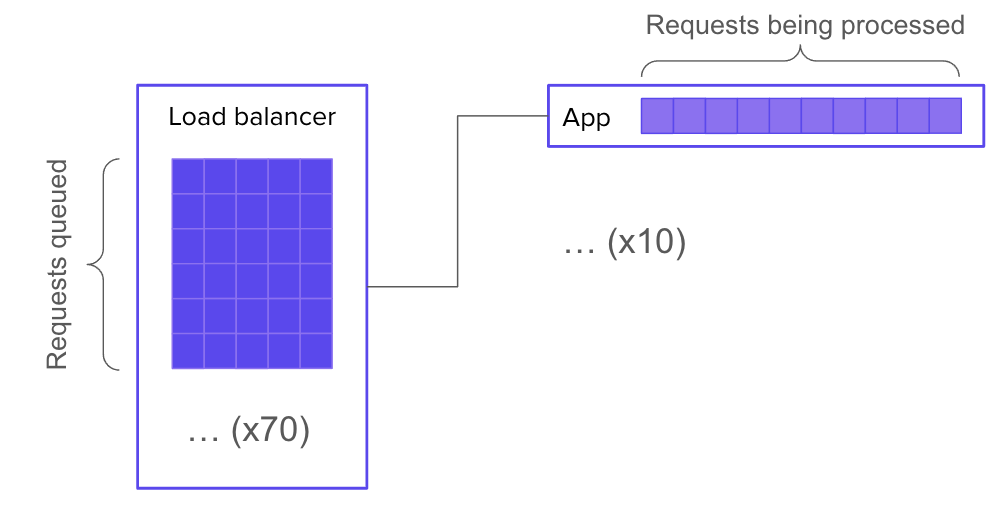
Let’s say your system has 10 servers behind a load balancer, and each server has enough resources to handle 10 concurrent requests. It follows that your overall system can handle 100 concurrent requests.

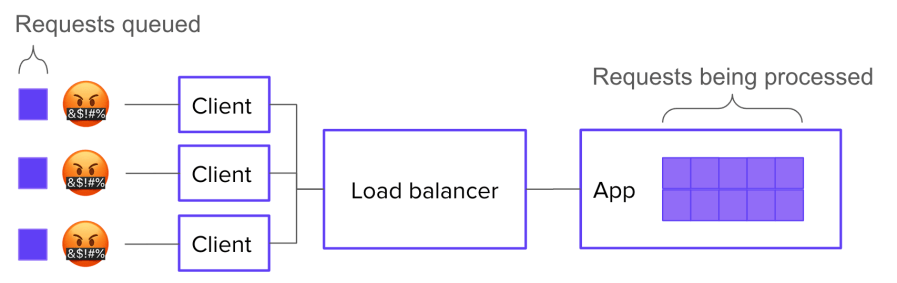
Now let’s say you have 170 requests in flight. 100 of those requests are actively being processed. What happens to the other 70?

Well, the most straightforward, job-interview-systems-design answer would be: they wait in a queue, which is implemented in the application logic.

This is great because it lets you show off your knowledge of how to implement a queue. But it’s not super realistic. Most of the time, we don’t make our applications worry about where the connections are coming from: the application just worries about serving the requests it gets. If your application simply accept()s new connections and starts working on them, then you don’t need to build a queue into it.

But that doesn’t mean there isn’t a queue! Instead of forming inside the application, a queue will form in the SYN backlog of the underlying network stack:

Of course, it can be advantageous instead to run your application through web server software that handles queueing for you. Then your 70 waiting requests will be queued up inside the web server:

But what if your web server doesn’t have any queueing built in? Then is there no queue? Of course not. There must be a queue, because the conditions for queue formation are still met. The queue may again take the form of a SYN backlog (but this time on the web server’s socket instead of the application’s socket). Or, it might get bumped back out to the load balancer (in which case, you’ll need a much bigger queue).

If you really do not want a queue, then you can tell your load balancer not to queue requests, and instead to just send 503 errors whenever all backends are busy. Then there’s no queue.

OR IS THERE?? Because, presumably, the requests you’re getting are coming from clients out there on the Internet that want the resource. Many of those clients, unless they’re lazy, will re-request the resource. So in effect, you’ve only moved the queue again:

Now, if you control the client logic, you’re in luck. You can explicitly tell clients not to retry. Finally, you’ve eliminated the queue.

LOL, just kidding. Because the human, your customer, still wants the resource. So what will they do? They will keep trying until they either get their data or get bored. Again, by trying to eliminate the queue, you’ve just moved it – this time, into your customers’ minds.

Requests represent intentions

If you have more requests to answer than you have space for, you will have a queue. The only way to eliminate the queue would be to eliminate the extra requests. But a request doesn’t start the moment you get a connection to your load balancer – it starts the moment your customer decides to load a resource.

Fight understanding decay with a rich Incident Summary

It only takes a few off-the-rails incidents in your software career to realize the importance of writing things down. That’s why so many companies’ incident response protocols define a scribe role. The scribe’s job, generally, is to take notes on everything that happens. In other words, the scribe produces an artifact of the response effort.

Scribe is a pretty simple – and therefore often dull – job. Usually, you just listen along and take a series of timestamped notes, like this:

  • 14:56 Incident call convened. Jamie is Incident Commander
  • 14:59 Dan is assigned as scribe
  • 15:00 Jamie posts to status page
  • 15:01 Jamie gets paged about a second service, possibly related
  • 15:06 Taylor joins call, Taylor assigned as Primary Investigator
  • 15:07 Jamie gives status update: two web servers seems to have dropped out of the cluster due to failing health checks; the health checks are failing with error connection timed out to redis-main.lan:6379

This is better than nothing. When new responders join the effort, they can read this timeline to get up to speed. And later, when it’s time to do a post-mortem, these notes can become (the first draft of) the timeline that gets reviewed.

But I teach scribes to create a very different kind of artifact: one that raises up the scribe from essentially a technical stenographer to an active and vital participant in the problem-solving effort.

The decay of understanding

As I’ve noted before on this very blog, if you want to fix a problem in a software system, you first have to build an understanding of the problem. Generally, the problems that can be solved without building understanding have already been eliminated.

Sometimes understanding seems to emerge spontaneously from the facts, like when someone deploys a change and the site goes down. But usually, incident responders have to work together to construct understanding over the course of the response effort. Often this process represents the bulk of the response team’s labor, and consequently, the bulk of the incident’s duration. What’s worse: the whole time you’re trying to build understanding, you have to fight against understanding decay.

As you respond to an incident, your understanding of the situation decays. Because:

  • You forget things you learned earlier.
  • The situation changes out from under you.

And furthermore, you’re not just trying to build your own understanding. You’re working as part of a team of responders who need to build a joint understanding in order to collaborate. Joint understanding suffers from the same sources of decay as individual understanding, along with many more sources:

  • Any two responders will get exposed to different facets of the problem. You’ll look at a different set of graphs, latch onto different error messages, and zoom in on different parts of a trace.
  • Two responders may assign different weights to the same piece of evidence. If you’re familiar with subsystem S, and you see evidence that subsystem S is malfunctioning, this will impact your mental model of the situation more heavily than it will impact that of your teammate, who is more familiar with a different part of the stack.
  • People continuously join and leave the response team. When a participant leaves, she takes her part of the joint understanding with her. When one joins, he needs to spend time “spinning up context” on the effort – and even then, he can at best obtain only an approximation of the understanding shared by the people already on the call.
  • Miscommunication is common, so even if two responders try to synchronize their understanding, their joint understanding will often end up with significant gaps.

A group’s ability to solve problems depends on joint understanding, and joint understanding decays over time. And in a high-pressure, dynamic situation (like an incident), it can decay fast. Unless a group works continuously to preserve and repair its joint understanding, this decay leads predictably to frustration, confusion, and mistakes. The center cannot hold.

There was an attempt (to preserve and repair joint understanding)

This need to preserve and repair joint understanding is the main reason that incident response demands a scribe. The scribe keeps a written artifact, which responders can refer to when they need to remember things they’ve forgotten, or resolve a disagreement about the facts of the case. This artifact also reduces the understanding decay that results from responders leaving the call, since those who newly join can get up to speed by reading it.

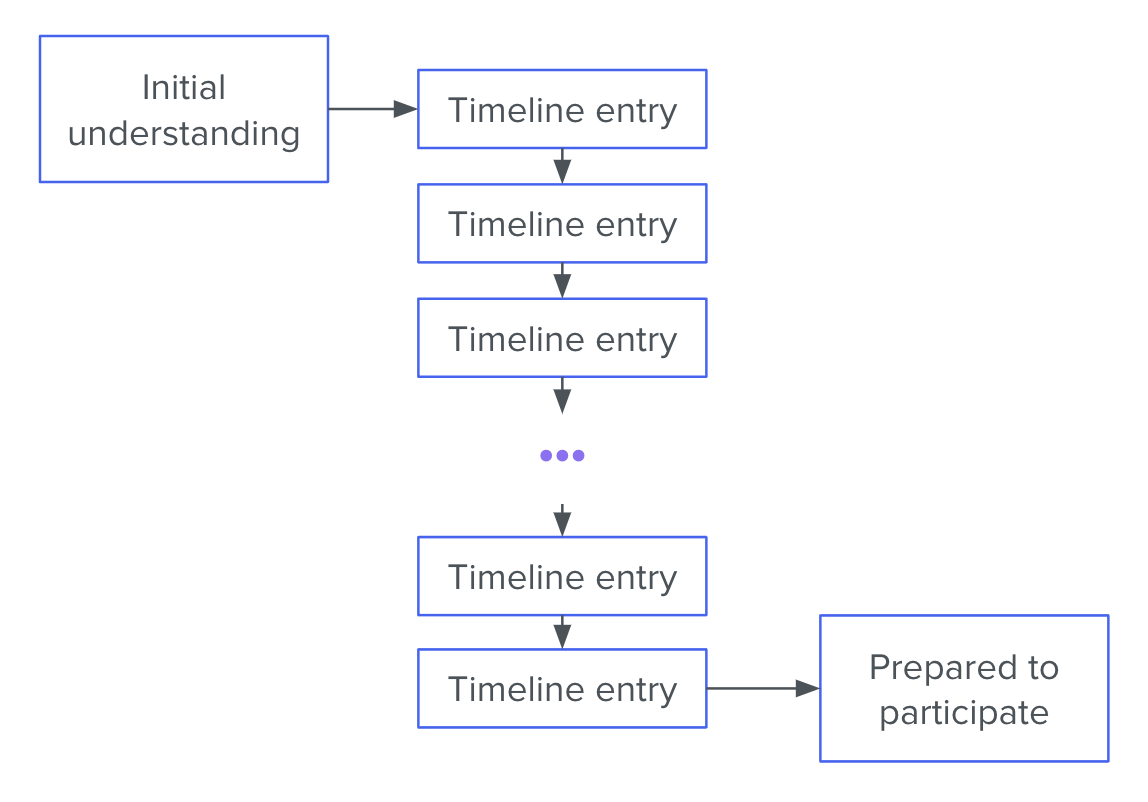
The usual kind of scribe artifact, a timeline of notes, is thus a method of maintaining and repairing understanding. And yet, as a tool for that purpose, consider its defects. The understanding encoded by the timeline is stored in “diff” format. Those who wish to come up to speed with the ongoing effort must, starting with their background knowledge, construct their understanding inductively.

This diff-format characteristic introduces 2 problems.

Problem 1: the amount of time that it takes to read through the timeline grows linearly with the timeline’s length. Eager new responders are encouraged to spin up on context by reading the timeline (or reading the chat backscroll, which is just another kind of timeline). But as an investigation goes on, the timeline gets longer and longer, making it more and more cumbersome to maintain joint understanding.

Problem 2 is even more serious. Because any two responders start with different background understandings, they will have a tendency to interpret the same facts differently, potentially ending up at quite different understandings. This is the Fundamental Common Ground Breakdown (link to KFBW paper), and it becomes more and more pernicious as the timeline gets longer.

Taken together, these two deficiencies mean the incident investigations that run the longest will also be the hardest to onboard new responders onto.

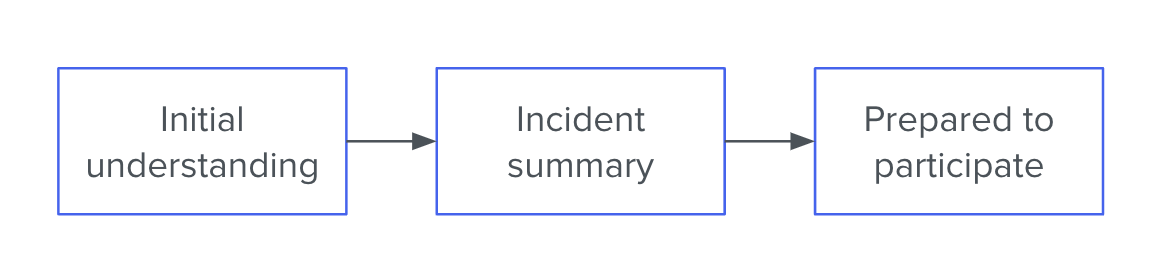
The Incident Summary

When it’s up to me, I ask the scribe to focus instead on composing an incident summary. This is a series of bullet points that lives at the top of the document. For example:

  • Since 09:04, users are experiencing increased page-load times. Several have filed support tickets.
  • At 09:04 there was a sharp increase in median web request latency, from ~40ms to ~90ms
  • From about 08:42 we observed a linearly increasing number of row locks in the database
  • We think the row locks are causing the high web request latencies
  • Anita is taking a closer look at the row locks to see where they’re coming from
  • It’s also possible that the web requests are getting slowed down for some other reason, and since they’re slow, they’re holding locks for longer. So Sigmund is investigating the request traces

or:

  • The hourly key-value backup job has failed 3 consecutive times (No customer-facing impact)
  • Starting with the run that kicked off at 18:31, the hourly backup job for the key-value store has been failing to run to completion
  • The job exits suddenly in the middle of copying files to cold storage. It produces no error message before crashing
  • Our best guess is that the job is running out of memory
  • Bradley is checking the server logs for OOMkill messages
  • The cause could also be something like a network timeout (but we think that would be logged, so maybe not)

The Incident Summary should go in its own section at the very top of the scribe document. It should be composed of 5–8 bullet points for a total of 50–150 words. It should cover (roughly in this order):

  1. The impact of the problem (especially with regard to customer experience)
  2. The most important symptoms that have been observed
  3. Our leading hypothesis to explain the symptoms
  4. What actions are being taken and by whom
  5. At least one alternative hypothesis that hasn’t been ruled out.

Why this is so much better

As a tool for maintaining and repairing joint understanding, the Incident Summary has many advantages over the traditional timeline format.

Instead of the current understanding being encoded in “diff” format, it is available to the reader in one quick bite. This eliminates the problem of linearly-increasing context spin-up time. It also serves to place bounds on how different any two responders’ individual understandings can be – since both must coincide with the Summary.

Finally – and most importantly, if you ask me – it forces the response team to discuss their hypotheses and the limits of their certainty. This results in better plans, which means shorter incidents.

Does this mean incident timelines are deprecated?

I don’t think so. There are still many notes worth taking that won’t end up in the Incident Summary, and it can make perfect sense to keep those notes in a timeline format.

However, I do think that the scribe’s primary focus should be keeping the Incident Summary accurate and succinct. If that focus detracts from the completeness of the timeline-formatted notes further down in the document, so be it. In the presence of time pressure and a shifting knowledge base, the Summary matters more.

You can get Leading Incidents, my 3-part course on incident response, for 30% off ($125 87.50) by joining the D2E mailing list now!

The World Record for Loneliness

About a year into COVID, when we were all at least 40% insane – and I had recently become a dad, so I was at like 65/70% – I became unaccountably obsessed with a pointless and, for almost all of history, unanswerable question:

What’s the farthest any person has been from the nearest other person?

Having not much better to do while my infant napped, I embarked on a long, spreadsheet-fueled journey of the mind to try to answer this question. I wanted to answer it not just for the present day (which, as we’ll see, is relatively easy), but for every point in human history.

Some of what follows is grim, I have to warn you. For most of human existence, if you were significantly far from all other people, you were probably about to die. But nevertheless, you’d have a chance of breaking humanity’s Loneliness Record before your impending death!

Early humanity

Back when there were only 2 humans in the world, every time they got farther from each other, both of them would simultaneously break the Loneliness Record.

However, unless you’re a Biblical literalist, it’s hard to imagine that there was ever a time when only 2 humans existed. Surely Homo sapiens emerged over the course of generations, each composed of beings that, in different ways, more or less resembled modern humans. So it makes more sense to start with the first migrations out of Africa, between 70,000 and 100,000 years ago. That’s when the distances start to get interesting.

Prehistory

As our ancestors migrated out of central Africa, they pushed into wilderness that was uninhabited by other humans. So we might think that they would have had plentiful opportunities to break the Loneliness Record.

However, we tend to travel in groups, especially when we’re going far. And you can’t break the Loneliness Record if you’re traveling in a group. Unless things go terribly wrong.

For my money, the most likely way for the Loneliness Record to have been broken during this period would be:

  1. A group of travelers sets out.
  2. They happen to go in a direction away from the rest of humanity.
  3. They travel far – farther than anyone would be able to travel alone.
  4. But then – uh oh! There’s a rockslide or something, and they all die.

In this scenario, the last of the travelers to die breaks our Record. Hooray!

Another way it could have happened is if someone got swept out to sea on a log. Since sailing ships hadn’t been invented yet, there’d be no other humans out there.

Now, you might wonder, what about camels? Once humans domesticated the camel, couldn’t they travel much farther over land? Yes! But humans didn’t figure out how to ride camels until about 3000 BC, by which point Austronesian peoples had already, for 15,000 years, been…

Sailing

Sailing ups the ante, because nobody lives in the ocean, and you can get a lot farther sailing a boat than clinging to a log. One of the same issues still confronts us, though: long distance sailing is usually done by groups, not individuals.

It seems likely that early sailors would have broken the loneliness record from time to time. Say your ship gets caught in a storm and blown 100 km off course. Then it sinks. If you’re the last survivor, you might get the dubious honor of breaking humanity’s Loneliness Record. Certainly, you could get a lot farther from other humans by sailing than by walking on land.

Once sailing started being used for trade, though, one has to imagine that the Record stopped getting broken so much. Advancements in sailing technology would bring distance gains, but they would also bring congestion. If sailing ships are frequently crossing the sea between nations, then even if you’re lucky (?) enough to be the doomed last survivor of a remote shipwreck, there’s probably another ship just over the horizon. So no Loneliness Trophy for you.

Of course, we can’t know when the Loneliness Record was broken during this period or by whom, because there’s no documentation. So let’s talk about the first era in which I was able to find any solid documentation of a person being Record-breakingly isolated.

The age of Antarctic Exploration

For some reason, people in the early 1900s thought it would be a really fun idea to trek to the South Pole. For Robert Falcon Scott, a Royal Navy officer and one of the first to make the trip, it was… not.

Scott led the Terra Nova expedition, an attempt to reach the South Pole for the first time in human history. But on January 17, 1912, when Scott’s party got to the Pole, they were devastated to find they’d been bested by the expedition of Norwegian explorer Roald Amundsen. Amundsen had reached the South Pole just 34 days before Scott.

If the explorers thought losing the race was bad, they were in for much worse. After a series of disasters, the entire party perished. Which is a bummer. But, on the bright side, they were 160 km from the rest of humanity when they finally succumbed to the cold. This is the first occurrence I could find of a plausible Loneliness Record-setting event with a specific distance and set of names. So congratulations to the Terra Nova expedition!

But even so, their record didn’t last long, on the historical scale. In 1934, Richard E. Byrd, an American Naval officer who had in 1926 made the first flight over the South Pole (but that’s not of interest here, since he had a co-pilot) operated a small weather station in Antarctica. The station was called Bolling Advance Base, and it was situated 196 km from the nearest inhabited location: Little America II base, on the coast.

Eventually, around August of 1934, Byrd stopped sending intelligible radio transmissions back to Little America II. A rescue party was dispatched, which found Byrd near death, suffering from frostbite and carbon monoxide poisoning. He survived to lead several more Antarctic expeditions, and for the rest of his life, he held the record (at least as far as I can tell) for Loneliest Person!

And, by the same token, Byrd had become the last person to break the Loneliness Record while staying on Earth.

The final frontier

Spacefaring really changed the scale of the Loneliness Record problem. Now our species was no longer confined to a 2-dimensional surface.

The first (human) spacefarer was Comrade Yuri Gagarin of the USSR. He took off from Baikonur Cosmodrome on April 12, 1961, and traveled in a parabolic orbit that took him 327 km above the surface of the Earth. That’s 131 km farther than Byrd’s weather station. Congratulations, Yuri Gagarin!

Gagarin got to hold this record for several years. His space mission, Vostok 1, had a higher apogee than any other of the 1-crewmember space missions (the USSR’s Vostok program and the USA’s Mercury program). And after those, we stopped sending people into space alone.

327 km is pretty far. And since the apogee of Vostok 1’s parabola was over the south Pacific, Gagarin’s distance from other humans might even have been somewhat greater. So it was eight years before the Loneliness Record was broken again. This time, though, it was utterly smashed, by an order of magnitude.

A little while after Buzz Aldrin and Neil Armstrong descended to the lunar surface on July 24, 1969, Michael Collins (who continued orbiting the moon) reached a distance of 3592 km (the Moon’s diameter and change) from his fellow travelers.

The remaining Apollo missions

Now from here, for Apollos 12–17, things are a little fuzzier. A lot depends on the exact trajectories of the capsules, and I won’t go into it here (but corner me with a pen and a cocktail napkin some time). So I might have made a mistake here, even beyond the obvious mistake of embarking on this pointless thought experiment in the first place. But, after reviewing the numbers, I think the next Record-breaking event occurred on Apollo 15:

And the last time the Loneliness Record was broken was on the Apollo 16 mission, by Command Module pilot Ken Mattingly:

My heartfelt congratulations to Ken Mattingly, the World Champion of Loneliness!

History isn’t over… yet!

One day – assuming humanity doesn’t somehow burn itself out of existence first 😉 – somebody is gonna come for what’s Ken’s.

In Kim Stanley Robinson’s Red Mars, Arkady Bogdanov and Nadia Cherneshevsky are among the First Hundred humans to live on Mars. They regularly travel the planet’s empty surface in lighter-than-air craft. Something like that could get you a Loneliness Record.

More likely, the next Record breaker will be the last survivor of some space voyage. On Mars, you can’t get meaningfully more than 6,800 km from any other point. But if you’re on the way to Mars and life support fails, then someone gets to break Mattingly’s record by probably several orders of magnitude.

This article is off the beaten path for my blog, which is usually about incident response and site reliability engineering. I hope you’ve enjoyed this pointless endeavor as much as I enjoyed wasting my time putting it together!

Explaining the fire

When your site goes down, it’s all hands on deck. A cross-functional team must assemble fast and pursue an organized response. It feels like fighting a fire. So it’s not surprising that formal IT incident management tends to borrow heavily from the discipline of firefighting.

However, in software incident response, we have a crucial constraint that you won’t find in firefighting. Namely, in order to fix a software product, we first have to understand why it’s broken.

When the firefighters arrive at the blazing building, they don’t need to explain the fire. They need to put it out. It doesn’t matter whether a toaster malfunctioned, or a cat knocked over a candle, or a smoker fell asleep watching The Voice. The immediate job is the same: get people to safety and put out the fire.

But when PagerDuty blows up and we all stumble into the incident call, we need at least a vague hypothesis. Without one, we can’t even start fixing the problem. What should we do? Reboot one of the web servers? Which one? Should we revert the last deploy? Should we scale up the database? Flush the CDN? Open a support ticket with Azure? Just wait?

We can’t act until we have at least some explanation for how the outage came about.

Often, the process of diagnosis – of explaining the failure – takes up the majority of the incident. Diagnosis isn’t easy, especially in a group and under pressure. Important facts go ignored. Hypotheses get forgotten, or remain unchallenged in the face of new information. Action items fall through the cracks. Diagnostic disconnects like these add up to longer outages, noisier public-facing comms, and repeat failures.

And yet, when we look to improve IT incident response, what do we usually focus on? On-call rotations, status page updates, command-and-control structure. Sliding-down-the-firepole, radioing-with-dispatch type stuff.

In software incident response, we need to maintain a coherent diagnostic strategy in the face of scarce information and severe time pressure. This makes us, on one dimension at least, more like doctors than firefighters. This is one of the reasons that engineering teams find immense value in clinical troubleshooting. It brings rigor and transparency to the joint diagnostic effort.

I teach clinical troubleshooting as part of Scientific Incident Response in 4 Days. Check it out.

3 questions that will make you a phenomenal rubber duck

As a Postgres reliability consultant and SRE, I’ve spent many hours being a rubber duck. Now I outperform even the incisive bath toy.

“Rubber duck debugging” is a widespread, tongue-in-cheek term for the practice of explaining, out-loud, a difficult problem that you’re stumped on. Often, just by putting our troubles into words, we suddenly discover insights that unlock progress. The person we’re speaking to could just as well be an inanimate object, like a rubber duck. Hence the term.

Rubber ducks are great, but a human can add even more value. In this article, I’ll share my 3 favorite questions to ask when someone comes to me feeling stumped in a troubleshooting endeavor. These questions work even when you have no particular expertise in the problem domain. Master them, and you’ll quickly start gaining a reputation as the person to talk to when you’re stuck. This is a great reputation to have!

Question 1: How did you first start investigating this?

As we investigate a problem, our focus shifts from one thing to another to another. We go down one path and forget about others. We zoom in on details and neglect to zoom back out. It’s easy to lose perspective.

“How did you first start investigating this?” works well because, through the act of recounting their journey from initial observation to where they are now, your colleague will often regain perspective they’ve lost along the way. And by asking this particular question, you avoid having to suggest that they may have lost perspective – which could make them defensive.

Even if your colleague hasn’t lost perspective, hearing the story of the investigation so far will help you ask better questions and help them organize their thoughts.

Question 2: What observations have you made?

In troubleshooting a complex problem, it’s easy to forget what you already know. As you go along, you make lots of observations, small and large, interesting and boring, relevant and irrelevant. You can’t hold them all in your head.

When someone’s stuck, it often helps to review their observations. Not theories, not difficulties, not actions: directly observed facts.

Reviewing observations can help in a few different ways:

  • They may be entertaining a hypothesis that clashes with some previously learned (but since forgotten) fact. If so, they can now go ahead and discard that hypothesis.
  • Juxtaposing two observations may suggest a hypothesis that never occurred to them before, because they never held those two observations in their head simultaneously.
  • Listing out their observations may bring to mind something they haven’t looked at yet.

As your colleague recounts their observations, write them down in a numbered list. And, if you can, ask clarifying questions. Questions like “Does X always happen concurrently with Y, or only sometimes?” and “How does this differ from the normal behavior?”

Never underestimate the power of precisely stating the facts.

Question 3: If your hypothesis were wrong, how could we disprove it?

This question is my favorite.

One of the most common ways people get stuck in troubleshooting is tunnel vision. They get a single idea in their head about the cause of the problem, and that becomes all they can think about.

This question, “If your hypothesis were wrong, how could we disprove it?” flips the script. Instead of racking their brain trying to prove their theory, it gets them thinking about other possibilities. Asking this question can lead to lots of different outcomes, all of which represent progress:

  1. You come up with a way to disprove the hypothesis, and successfully disprove it. This may make your colleague sad for a few hours, but when they come back to the problem, they’ll make huge strides.
  2. You come up with a way to disprove the hypothesis, but fail to disprove it. The hypothesis is thus bolstered, and the next step becomes clear: elaborate a few different versions of it and try to disprove those.
  3. You can’t think of any way to disprove it. This means it’s probably not a hypothesis at all, since it’s not falsifiable. Therefore you must replace it with a new hypothesis. This may feel like a setback, but it’s really the only way forward.

How it fits together

Under the hood, these 3 questions are just different ways of invoking hypothetico-deductive reasoning, which I’ve written about previously (see Troubleshooting On A Distributed Team Without Losing Common Ground and You Know Who’s Smart? Friggin’ Doctors, Man.). I don’t know of any better way to achieve consistent problem-solving results in the face of complexity.

If you’re interested in learning how to apply these techniques in your career or in your organization, I can help. Shoot me an email!