did u ever read so hard u accidentally wrote?

Owning a production Postgres database is never boring.

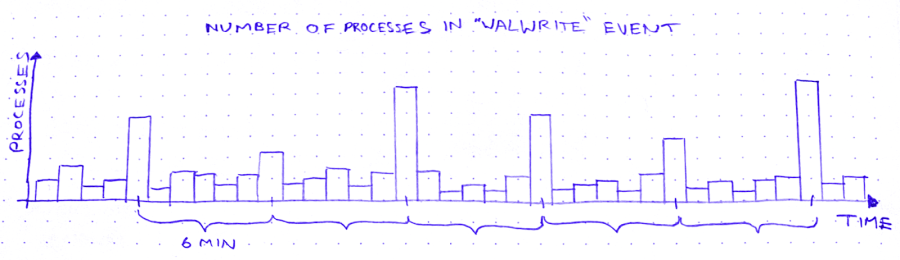
The other day, I’m looking for trouble (as I am wont to do), and I notice this weird curve in the production database metrics:

So we’ve got these spikes in WALWrite: the number of processes waiting to write to the write-ahead log (or “WAL”). The write-ahead log is written serially, so sometimes there’s contention for the mutex that lets you write to it. A queue forms.

But why does WALWrite spike periodically, every 6 minutes? Is this some cron job run amok? (*/6 * * * *? But then they’d only be 4 minutes apart at the hour boundaries…) Does a customer do some API request that updates a ton of records? Do I need to worry about this getting worse?

So I zoom out to see when the WALWrite spikes started:
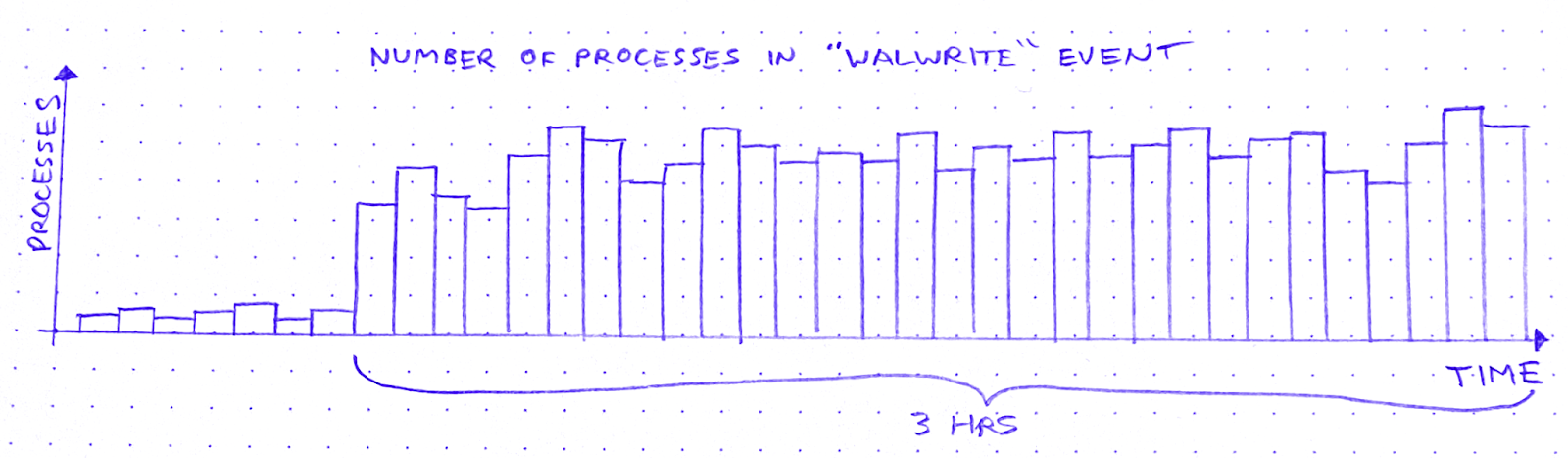
It started about 3 hours ago. Okay: what else started about 3 hours ago?

I scroll around looking at the database graphs. After about 15 minutes of highly scientific squinting and head-tilting, I’ve got two more graphs on my screen. The first is “Max transaction duration.” That is: the age of the oldest open transaction.

This is definitely related. It shares that 6-minute period, and the sawtooth pattern also started 3 hours ago. Great.

After a bit of digging and a brief Slack conversation, I know the reason for this sawtooth pattern. There’s an ongoing backfill into BigQuery via Datastream. As far as I can tell, what a Datastream backfill does, is it starts a transaction and then uses a cursor to page through the rows of the table. Something like:

BEGIN;
DECLARE curs CURSOR FOR SELECT * FROM table OFFSET ?;
OPEN curs;
FETCH FORWARD ? FROM curs INTO ?;
/* ~6 minutes later */
ROLLBACK;

After about 6 minutes the transaction closes and a new transaction begins, with a new offset. Repeat until table is backfilled.

The other new graph is “pages dirtied” by a particular query:

Now I don’t know what “pages dirtied” means. I look up “dirty page” on Urban Dictionary, but it’s a miss. So I resort to Googling around for a while. I eventually land on this Cybertec blog post (there’s always a Cybertec post. God bless ’em), which demystifies shared buffers for me.

When Postgres needs to write to a page, it:

  1. Writes the change to the WAL
  2. Writes the change to a buffer, marking the buffer as dirty in the process

Then a process called the background writer comes along at some point later and writes the dirty buffer to disk. Great! So that’s what “pages dirtied” means.

Except – and this is wild – the particular query whose “pages dirtied” rate is shown in the graph above is, SELECT * FROM foo WHERE id = ?. Yes you read that right: SELECT. Now I’m no SQL expert, but I thought SELECT (absent a FOR clause) was a read-only operation. Right? So what’s this about writing?

In fact, come to think of it, the sawtooth workload from before – the Datastream backfill – was also a read-only workload. So, good news and bad news. The good news is I’ve identified 2 workloads that correlate closely to the WALWrite spikes I’m trying to explain. The bad news is: they’re both read-only workloads.

At this point I need a walk, so I put on my hat and coat and I stomp through slush to the coffee shop. I feel flummoxed, and I try to think about literally anything else – Cyberpunk 2077… the French Revolution… what I’m gonna make for dinner. Anything but Postgres.

So, a few minutes minutes later, I’m waiting in line at a coffee shop, reading Postgres StackOverflow posts on my phone. And I find this one. Cybertec again! These guys are everywhere. What I learn from this post is revelatory: SELECT queries in Postgres are not read-only. True, a SELECT can’t modify rows. But it can sure as hell modify tuples!

A tuple is basically a version of a row. When you UPDATE (or DELETE) a row, Postgres doesn’t just update the data in place. It creates a new tuple with the new data and adds that tuple to the heap. It also adds entries to any relevant indexes.

There is no “row” in the heap. There are only tuples. A SELECT query doesn’t just “fetch” a row. It fetches some number of tuples, determines which tuple is visible to the present transaction, and uses that tuple’s data to construct a row.

In order to make that visibility determination, Postgres needs to know, for each tuple fetched, whether the transaction that wrote that tuple has ended. It can determine this by referring to the commit log (pg_clog), but that involves disk reads, so it’s not very fast. Wouldn’t it be great if somehow we could cache the result of that pg_clog lookup so that subsequent queries can skip it?

Enter hint bits. When a SELECT checks pg_clog and determines that the transaction that wrote a tuple is closed, it sets a bit on that tuple. A “hint bit.” This way, subsequent SELECTs that fetch the same tuple won’t have to consult pg_clog.
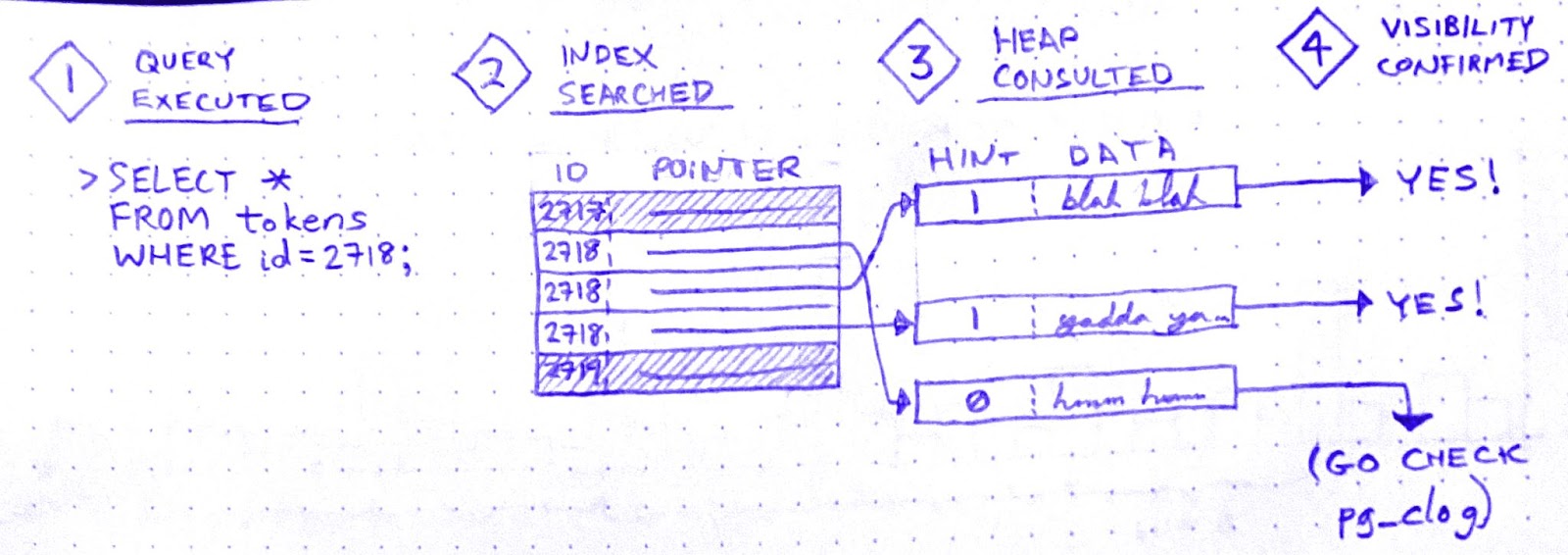
So it’s an optimization. But, if you’ve been paying attention, you now see why SELECTs in Postgres aren’t read-only: Setting a hint bit is a write. It dirties the page.

Aha! I’m starting to get a hypothesis here:

  1. Datastream starts a transaction in order to SELECT * FROM foo
  2. While the Datastream transaction is open, many foo rows are SELECTed and UPDATEd by other, concurrent transactions.
  3. Therefore, while the Datastream transaction is open, many of the concurrent SELECTs on foo must fetch multiple tuples per row. Whenever they do, they encounter tuples written by the Datastream transaction
  4. Datastream ends its transaction.
  5. All subsequent SELECTs that encounter tuples written by the Datastream transaction will now update the hint bits for those tuples after seeing in pg_clog that the transaction is closed.

But it doesn’t quite hang together yet. I still see two major cracks in this hypothesis:

(a) In (3): why has the Datastream transaction created tuples? That’s weird, right?

(b) And in (5): why does updating the hint bits cause contention for WAL writes? (by default, hint bit updates do not trigger a WAL write.)

Let’s do (b) first. That’s easier.

When recovering from a crash, Postgres starts from a checkpoint: a WAL entry representing an instant at which all data is up to date on disk. Then it replays all subsequent WAL changes against the data pages on disk. In order for this to work, the pages on disk must be internally consistent.

How could a page become internally inconsistent, you say? Torn writes. That’s when part of the page is written to disk, but before the next write() call can finish writing the page to disk, the system crashes. If a page on disk is “torn,” crash recovery can’t proceed. That’s why Postgres has a setting called full_page_writes, which is on by default. With full_page_writes on, the first time a page is dirtied after a checkpoint, that page is written in its entirety to the WAL.

This explains why updating hint bits caused a run on the WAL. In fact, when I raise the interval between checkpoints, the WALWrite spikes disappear.

Hooray!

But what about (a)? Why would the Datastream backfill create tuples? If it doesn’t create tuples, this whole hypothesis becomes untenable.

Well, sorry to disappoint you, but I don’t know why – or even whether – the Datastream backfill creates tuples. Perhaps it doesn’t, and my hypothesis is wrong. If you have an alternative hypothesis, please comment!

Ops is like this a lot of the time. Once you get a working fix, you move on to whatever’s the next biggest source of anxiety. Sometimes you never get a fully satisfying “why.” But you can still love the chase.


Putting a meaningful dent in your error backlog

“Let’s track our production errors,” they said. “We’ll harvest insights,” they said. And 3 years later, all we have to show for it is an error tracking dashboard so bloated with junk that it makes us sick to look at.

When error tracking is working, engineers engage with it regularly, scrutinizing every new error thrown. This regular engagement is what transmutes raw error data into meaning. If engagement ceases (or never gets started) then, like bull thistle in a sad old garden, noise dominates.

Of course we often don’t realize how noisy the errors have gotten until things are already well out of hand. After all, we’ve got shit to do. Deadlines to hit. By the time we decide to get serious about error management, a huge, impenetrable, meaningless backlog of errors has already accumulated. I call this stuff slag.

Slag is viscous. Try to dig yourself out of the heap by brute force, one error at a time, starting with the most common, and you won’t get very far. After you investigate the top 10 errors and find out that 9 of them are complete non-issues that aren’t worth fixing, the wind will drain from your sails. Investigating errors takes a lot of time, and there are still 340 to go! Wait, I just refreshed the page and there’s 348 now.

Slag engenders hopelessness, and hopelessness drives teams to declare bankruptcy on error tracking.

The reason slag engenders hopelessness is because you’d have to dig through essentially all the slag in order to get any value. But by excluding behaviors, you can create incremental value as you burn down the error list. This changes the tradeoff, making error remediation work into something that’s immediately and obviously worth doing.

The magic of excluded behaviors

Suppose you have a list of errors that your system throws in production. Sorting this list by frequency-of-error and eyeballing it, you see that it contains about:

  • 40 kinds of network timeouts
  • 30 different JSON parse errors
  • 20 Nil pointer exceptions, spread across the codebase
  • 12 Postgres deadlocks
  • … many more errors that are harder to lump into categories.

I would look at this list and say, “Well, deadlocks are never expected or desired, and they’re often contributing factors in larger problems… so let’s exclude deadlocks.” (Someone else, with different constraints and knowledge, might justifiably pick a different behavior to exclude.) Anyway, we pick a behavior, then we exclude it.

Here’s how you exclude a behavior:

  • List all the individual errors in the class to be excluded.
  • Burn down that list by fixing each underlying bug.
  • Create a (non-paging) monitor to catch regressions.

When you exclude a behavior, you get immediate incremental value. Where before there was a system that would sometimes deadlock in production, now there’s a system that is known never to deadlock in production.

This guarantee is immensely valuable. By eliminating deadlocks from the system, you block off a whole range of ways that surprising failure modes could creep into your system. This yields a direct increase in reliability.

Excluding a behavior also makes your system easier to troubleshoot! Suppose you’re hunting down a bug that manifests as sudden server process crashes in production. You might wonder if an out-of-memory condition could be to blame for this behavior. And so you might spend half a day scrolling through logs, trying to correlate OOM events with your crashes. Whereas, if you’ve excluded out-of-memory errors, then you can hop right over that whole entire rabbit hole. Haven’t been notified about any OOMs? Then there haven’t been any OOMs.

Here are some classes of behavior that you might choose to exclude:

  • deadlocks
  • out-of-memory crashes
  • network timeouts between load balancer and web server
  • 503 errors
  • Nil-pointer exceptions
  • database transactions longer than 30 seconds
  • Go panics

It shouldn’t be hard to think of more.

Do you really have to eliminate every member of an excluded class? Can’t you make exceptions?

Sure you can make exceptions. Just make sure you document the reasoning for any exception you make.

Because another great thing you get out of excluded behaviors is a list of known vulnerabilities to failure. This list is worth its weight in gold as a tool for knowledge transfer activities, such as onboarding, planning, and architecture design.

After a while, you get kind of addicted to excluding behaviors. Each new exclusion makes your production system that much more boring.

And boring is how we like ’em.

No Observability Without Theory: The Talk

Last month, I had the unadulterated pleasure of presenting “No Observability Without Theory” at Monitorama 2024. If you’ve never been to Monitorama, I can’t recommend it enough. I think it’s the best tech conference, period.

This talk was adapted from an old blog post of mine, but it was a blast turning it into a talk. I got to make up a bunch of nonsense medical jargon, which is one of my favorite things to do. Here are my slides, and the video is below. Enjoy!

Fight understanding decay with a rich Incident Summary

It only takes a few off-the-rails incidents in your software career to realize the importance of writing things down. That’s why so many companies’ incident response protocols define a scribe role. The scribe’s job, generally, is to take notes on everything that happens. In other words, the scribe produces an artifact of the response effort.

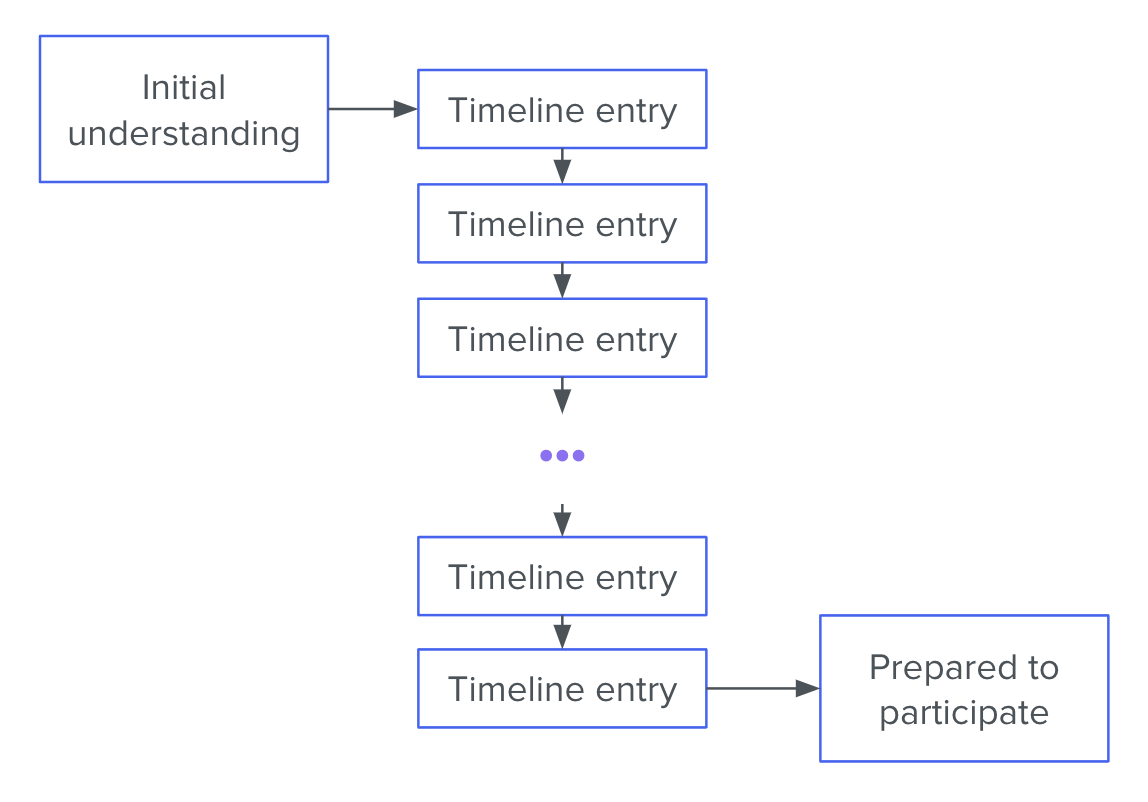
Scribe is a pretty simple – and therefore often dull – job. Usually, you just listen along and take a series of timestamped notes, like this:

  • 14:56 Incident call convened. Jamie is Incident Commander
  • 14:59 Dan is assigned as scribe
  • 15:00 Jamie posts to status page
  • 15:01 Jamie gets paged about a second service, possibly related
  • 15:06 Taylor joins call, Taylor assigned as Primary Investigator
  • 15:07 Jamie gives status update: two web servers seems to have dropped out of the cluster due to failing health checks; the health checks are failing with error connection timed out to redis-main.lan:6379

This is better than nothing. When new responders join the effort, they can read this timeline to get up to speed. And later, when it’s time to do a post-mortem, these notes can become (the first draft of) the timeline that gets reviewed.

But I teach scribes to create a very different kind of artifact: one that raises up the scribe from essentially a technical stenographer to an active and vital participant in the problem-solving effort.

The decay of understanding

As I’ve noted before on this very blog, if you want to fix a problem in a software system, you first have to build an understanding of the problem. Generally, the problems that can be solved without building understanding have already been eliminated.

Sometimes understanding seems to emerge spontaneously from the facts, like when someone deploys a change and the site goes down. But usually, incident responders have to work together to construct understanding over the course of the response effort. Often this process represents the bulk of the response team’s labor, and consequently, the bulk of the incident’s duration. What’s worse: the whole time you’re trying to build understanding, you have to fight against understanding decay.

As you respond to an incident, your understanding of the situation decays. Because:

  • You forget things you learned earlier.
  • The situation changes out from under you.

And furthermore, you’re not just trying to build your own understanding. You’re working as part of a team of responders who need to build a joint understanding in order to collaborate. Joint understanding suffers from the same sources of decay as individual understanding, along with many more sources:

  • Any two responders will get exposed to different facets of the problem. You’ll look at a different set of graphs, latch onto different error messages, and zoom in on different parts of a trace.
  • Two responders may assign different weights to the same piece of evidence. If you’re familiar with subsystem S, and you see evidence that subsystem S is malfunctioning, this will impact your mental model of the situation more heavily than it will impact that of your teammate, who is more familiar with a different part of the stack.
  • People continuously join and leave the response team. When a participant leaves, she takes her part of the joint understanding with her. When one joins, he needs to spend time “spinning up context” on the effort – and even then, he can at best obtain only an approximation of the understanding shared by the people already on the call.
  • Miscommunication is common, so even if two responders try to synchronize their understanding, their joint understanding will often end up with significant gaps.

A group’s ability to solve problems depends on joint understanding, and joint understanding decays over time. And in a high-pressure, dynamic situation (like an incident), it can decay fast. Unless a group works continuously to preserve and repair its joint understanding, this decay leads predictably to frustration, confusion, and mistakes. The center cannot hold.

There was an attempt (to preserve and repair joint understanding)

This need to preserve and repair joint understanding is the main reason that incident response demands a scribe. The scribe keeps a written artifact, which responders can refer to when they need to remember things they’ve forgotten, or resolve a disagreement about the facts of the case. This artifact also reduces the understanding decay that results from responders leaving the call, since those who newly join can get up to speed by reading it.

The usual kind of scribe artifact, a timeline of notes, is thus a method of maintaining and repairing understanding. And yet, as a tool for that purpose, consider its defects. The understanding encoded by the timeline is stored in “diff” format. Those who wish to come up to speed with the ongoing effort must, starting with their background knowledge, construct their understanding inductively.

This diff-format characteristic introduces 2 problems.

Problem 1: the amount of time that it takes to read through the timeline grows linearly with the timeline’s length. Eager new responders are encouraged to spin up on context by reading the timeline (or reading the chat backscroll, which is just another kind of timeline). But as an investigation goes on, the timeline gets longer and longer, making it more and more cumbersome to maintain joint understanding.

Problem 2 is even more serious. Because any two responders start with different background understandings, they will have a tendency to interpret the same facts differently, potentially ending up at quite different understandings. This is the Fundamental Common Ground Breakdown (link to KFBW paper), and it becomes more and more pernicious as the timeline gets longer.

Taken together, these two deficiencies mean the incident investigations that run the longest will also be the hardest to onboard new responders onto.

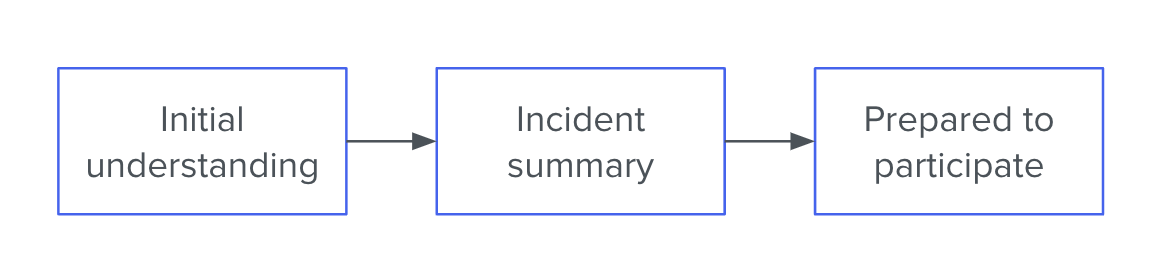
The Incident Summary

When it’s up to me, I ask the scribe to focus instead on composing an incident summary. This is a series of bullet points that lives at the top of the document. For example:

  • Since 09:04, users are experiencing increased page-load times. Several have filed support tickets.
  • At 09:04 there was a sharp increase in median web request latency, from ~40ms to ~90ms
  • From about 08:42 we observed a linearly increasing number of row locks in the database
  • We think the row locks are causing the high web request latencies
  • Anita is taking a closer look at the row locks to see where they’re coming from
  • It’s also possible that the web requests are getting slowed down for some other reason, and since they’re slow, they’re holding locks for longer. So Sigmund is investigating the request traces

or:

  • The hourly key-value backup job has failed 3 consecutive times (No customer-facing impact)
  • Starting with the run that kicked off at 18:31, the hourly backup job for the key-value store has been failing to run to completion
  • The job exits suddenly in the middle of copying files to cold storage. It produces no error message before crashing
  • Our best guess is that the job is running out of memory
  • Bradley is checking the server logs for OOMkill messages
  • The cause could also be something like a network timeout (but we think that would be logged, so maybe not)

The Incident Summary should go in its own section at the very top of the scribe document. It should be composed of 5–8 bullet points for a total of 50–150 words. It should cover (roughly in this order):

  1. The impact of the problem (especially with regard to customer experience)
  2. The most important symptoms that have been observed
  3. Our leading hypothesis to explain the symptoms
  4. What actions are being taken and by whom
  5. At least one alternative hypothesis that hasn’t been ruled out.

Why this is so much better

As a tool for maintaining and repairing joint understanding, the Incident Summary has many advantages over the traditional timeline format.

Instead of the current understanding being encoded in “diff” format, it is available to the reader in one quick bite. This eliminates the problem of linearly-increasing context spin-up time. It also serves to place bounds on how different any two responders’ individual understandings can be – since both must coincide with the Summary.

Finally – and most importantly, if you ask me – it forces the response team to discuss their hypotheses and the limits of their certainty. This results in better plans, which means shorter incidents.

Does this mean incident timelines are deprecated?

I don’t think so. There are still many notes worth taking that won’t end up in the Incident Summary, and it can make perfect sense to keep those notes in a timeline format.

However, I do think that the scribe’s primary focus should be keeping the Incident Summary accurate and succinct. If that focus detracts from the completeness of the timeline-formatted notes further down in the document, so be it. In the presence of time pressure and a shifting knowledge base, the Summary matters more.

You can get Leading Incidents, my 3-part course on incident response, for 30% off ($125 87.50) by joining the D2E mailing list now!

Ask questions first, shoot later

One piece of common-sense advice that you often hear about incident response is,

Fix it first. Ask “why” later.

This chestnut is often deployed to combat what is perceived as excessive investigation. And like most common-sense advice, it’s approximately right in lots of situations. But it misses a crucial point, and at its worst, this attitude perpetuates failure.

Diagnosing and fixing

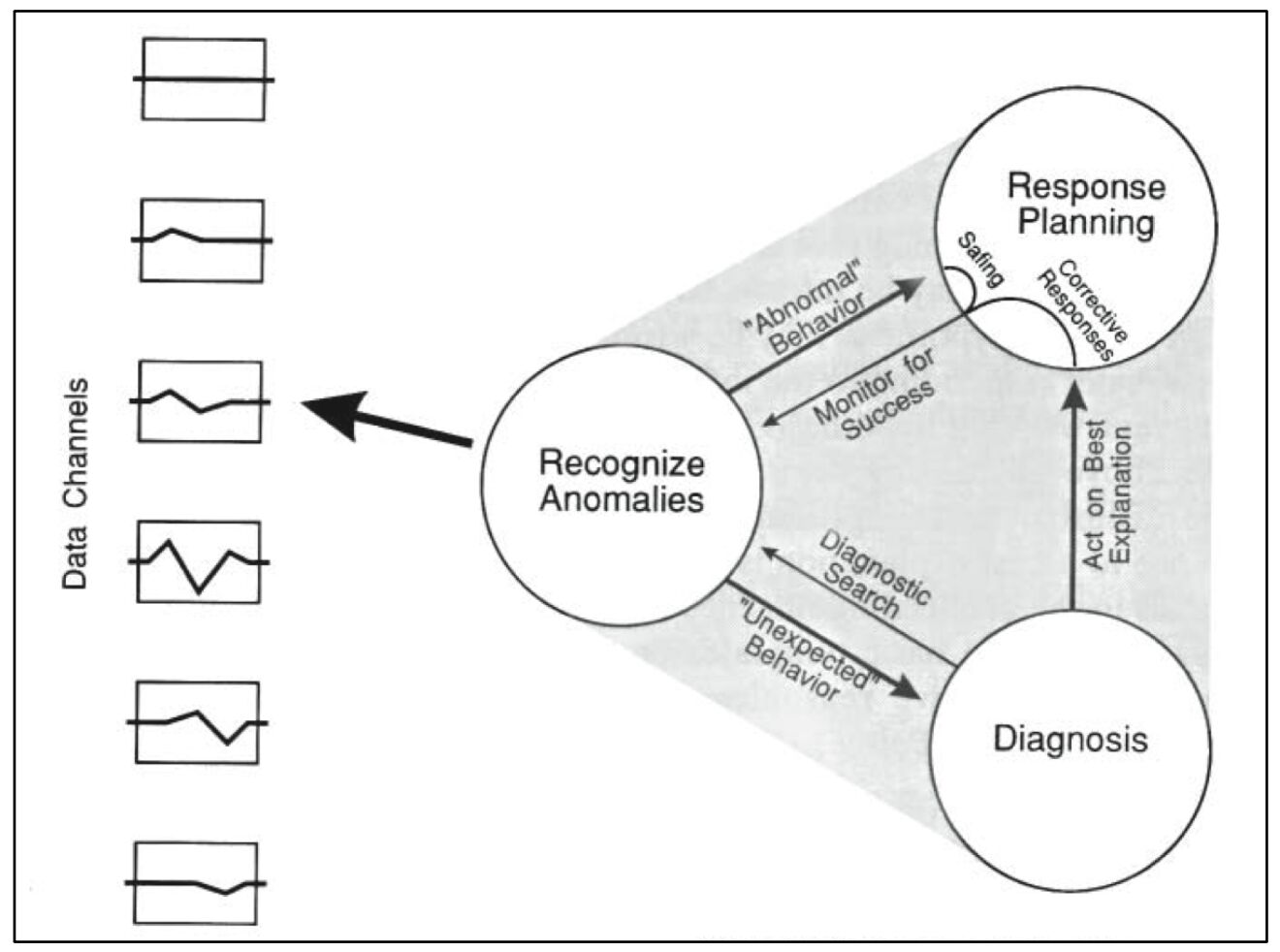
Incident response comprises two intertwined, but distinct, activities: diagnosing and fixing. This point is illustrated in David Woods’ 1995 paper, Cognitive demands and activities in dynamic fault management: abductive reasoning and disturbance management (which uses the term “response planning” for what I’m calling “fixing”):

Diagnosing and fixing can involve overlapping activities, such that they blend together during incident response. For example, if you have diagnosed a partial outage as resulting from a web server that’s used up all its allotted file handles, you might restart that web server. This would be a “diagnostic intervention,” in that it serves to advance both the fix (if your diagnosis holds water, then restarting the web server will fix the problem) and the diagnosis (if restarting the web server fixes the problem, then you have additional evidence for your diagnosis; if it doesn’t, then you know you need a new diagnosis).

The fact that fixing and diagnosing often converge to the same actions doesn’t change the fact that these two concurrent activities have different goals. The goal of fixing is to bring the system into line with your mental model of how it’s supposed to function. The goal of diagnosing is to bring your mental model into line with the way the system is actually behaving.

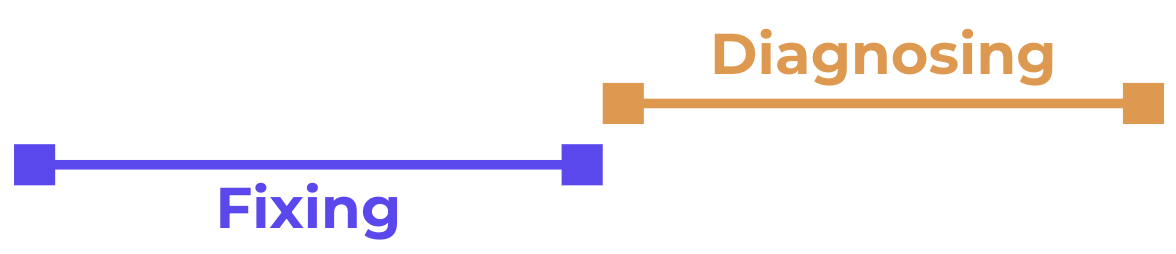
Usually these two goals are aligned with one another, but sometimes they demand different actions. And that’s what opens the door for someone to say, “Let’s fix the problem first and ask questions later.” However, this implies a naïve conception of the incident response process, which I’ll represent schematically here:

In this view, you fix first, then you diagnose – perhaps in a post-mortem or a root-cause analysis. But in a field like ours, in which complex systems are at play, this is simply not how things work. A complex system has infinitely many possible failure modes. Therefore there are infinitely many possible actions that might be necessary to recover from a failure. In order to even attempt a fix, you must always start with some kind of diagnosis.

Sure, sometimes the diagnostic effort might be very brief and straightforward. Suppose you get an alert about some new error happening in production. You immediately recognize the error as resulting from a code change you just deployed, and you revert the change.

Because the diagnosis was so quick, it may feel like you simply fixed the problem as soon as you saw it. But you still undertook a diagnostic process. You saw the alert and developed a hypothesis (“My code change caused these errors”), and that hypothesis turned out to be right. Had you truly done no diagnosis, then you wouldn’t have known what to do. The incident actually looked like this:

Contrast this with another scenario. You get alerted about slow page-loads. Together with a team, you begin to investigate the slowness. But no explanation is forthcoming. It takes an hour of searching logs, reading documentation, and consulting with other teams before you have a satisfactory explanation: an mission-critical cache object has gotten too large to store in the cache, so it has to be fetched from origin on every request. Upon reaching this diagnosis, you immediately know what to do to fix the problem:

During this long diagnostic phase, nobody would have said, “Fix the problem first. Worry about ‘why’ later.” The diagnostic effort was clearly pursued in service of fixing the issue. Whether it takes a split-second or a week, a diagnosis (at least a differential diagnosis) always has to be reached before the problem can be fixed.

These are simple examples. In a more general case, you do some diagnosis, which produces a potential fix. That fix doesn’t work (or only partly works), so diagnosis continues until another potential fix presents itself. And since multiple responders are present on the call, diagnosis doesn’t generally have to totally halt in order for fixes to be pursued:

The “Fix first” shibboleth comes out when someone perceives that there is already a potential fix, but nobody is applying that fix yet. So when you hear it, or you’re tempted to speak it yourself, first ask yourself:

  1. Is there a potential fix on the table?
  2. Is that potential fix worth pursuing immediately?

If the answer to both of these questions is “yes,” then by all means, get on the fix. But don’t halt diagnosis to do so, unless you’re so labor-constrained that you must.

If either question elicits a “no,” then you should talk through your reasoning with the group and make the case for pursuing further diagnosis before taking action.

Fix first, ask questions later.

Ask questions until you can fix.

––

I teach Scientific Incident Response in 4 Days, an in-depth incident response training course for engineering teams.

Garden-path incidents

Barb’s story

It’s 12 noon on a Minneapolis Wednesday, which means Barb can be found at Quang. As the waiter sets down Barb’s usual order (#307, the Bun Chay, extra spicy), Barb’s nostrils catch the heavenly aroma of peanuts and scallions and red chiles. A wave of calm moves through her. Barb pulls her chair forward, cracks apart her wooden chopsticks, and…her pager goes off.

After cursing under her breath, she dutifully reads the message:

Error rate for `environment:production' exceeds 100 msg/s

Welp.

Barb grabs one quick bite of spring roll as she flags down the waiter for a to-go box. Opening Slack on her phone, she declares an incident, joins the Zoom call, and hurries back up Nicollet Ave. and around the corner, toward her apartment.

Five minutes later, finally sitting at her laptop, Barb is pretty sure she knows what the problem is. The error flooding the logs is:

object 'nil' has no method 'reimport!'

That looks like a straightforward app bug to her, and wouldn’t you know it? Right before these errors started cropping up, there was a deploy to the Rails app by a newish dev named Alice, who according to her Slack profile, is based in Seattle. Barb asks this ‘Alice’ to join the incident Zoom.

– Hi, this is Alice. What’d I do?
– Thanks for joining, Alice. I’m incident commander for this spike of production errors. It looks like you deployed a change at 17:46 UTC and a bunch of errors started happening. Can you revert that change please?
– Sure, no problem. I’ll put together the revert PR now.

5 minutes later, Alice’s PR is approved. Alice click’s “Merge.” The pair begin the anxious but familiar 15-minute wait for CI to pass, all the while greeting and informing the bewildered latecomers who straggle into the call. 

Alice’s story

Alice stares blankly at the white rectangle on her monitor. She spent her first hour getting yesterday’s frontend bugfixes pushed out, and now it’s time to start her PowerPoint. She’ll be working on this PowerPoint for the rest of the morning, probably through lunch, and all afternoon.

Alice shuts her eyes and heaves a dismal sigh. Alice fucking hates PowerPoint. But she can’t put it off anymore. So she dons her headphones, cracks her knuckles,, and… gets an urgent Slack message:

Morning, Alice – we’ve got a production incident involving a spike of errors, and it looks like it coincides with a deploy of yours. Can you jump on https://zoom.globocorp.co/z/123456789… when you have a moment please?

As she waits for Zoom to load, Alice feels something almost like relief. At least she doesn’t have to work on that goddamn PowerPoint yet.

– Hi, this is Alice. What’d I do?
– Thanks for joining, Alice. I’m incident commander for this spike of production errors. It looks like you deployed a change at 16:46 UTC and a bunch of errors started happening. Can you revert that change please?
– Sure, no problem. I’ll put together the revert PR now.

Alice quickly whips up that PR and gets it approved. She spends the next 15 minutes waiting for CI to pass, while absent-mindedly writing the first slide of her PowerPoint. By the time the tests are green, she has typed out and deleted 4 different titles.

The real story

This incident seems to have gone about as well as it could, considering. Alice was on the call within 7 minutes of the alert, and a PR was ready 5 minutes later. It would be great if CI were faster, or even better if CI could be skipped for a revert. They’ll talk about that at the post-mortem.

However, nobody in the call yet knows what really happened. What really happened is this:

    • Alice’s 16:46 UTC deploy was the first to pick up the latest Docker image.
    • The new Docker image includes an update to a software dependency.
    • The updated dependency has a bug that only shows up in production.

    But instead of knowing any of that, Alice and Barb are sitting here for 15 minutes waiting for CI to run, so they can deploy a fix that won’t even work.

    This is a garden-path incident. Barb has what she feels is a strong signal from the telemetry, which points toward a bug in Alice’s code. Alice has what she feels is a strong signal, which is that Barb seems very confident in her conclusion. But they’ve been led up the garden path, and as a consequence, this incident will run longer than it needs to.

    How this could all have been avoided

    Imagine instead, that Barb and Alice are both in the habit of saying their hypotheses out loud.

    When Alice joins the call, Barb instead says:

    – Thanks for joining, Alice. I’m incident commander for this spike of production errors. It looks like you deployed a change at 16:46 UTC and a bunch of errors started happening. My hypothesis is that your change triggered this spike of errors. Can you revert the change please?

    Instead of letting Alice infer that the cause of the error spike is already known to be her deploy, Barb acknowledges the limits of her certainty. She has a hypothesis, not a definitive diagnosis. This gives Alice the opportunity to respond with something like:

    – Well, are the errors from the backend or the frontend? Because my change was frontend-only.

    And just like that, Alice and Barb have stepped back from the garden path. Instead of waiting around for a useless CI cycle, they can continue straight away with diagnosis.

    Note that, even if Barb doesn’t state her hypothesis, things will still be okay as long as Alice does:

    – Hi, this is Alice. What’d I do?
    – Thanks for joining, Alice. I’m incident commander for this spike of production errors. It looks like you deployed a change at 16:46 UTC and a bunch of errors started happening. Can you revert that change please?
    – Sure, no problem. I’ll put together the revert PR now. Just to be clear, the hypothesis is that my frontend-only changeset is somehow causing these nil-has-no-method errors in the backend?
    Uh, did you say frontend-only?

    Again, Barb and Alice have gotten themselves off the garden path. Which means this technique – stating your hypothesis and asking for rule-outs – is something you can do unilaterally starting today to make your team better at troubleshooting.

    Another thing you can do to make your team better at troubleshooting is employ Clinical Troubleshooting against your next head-scratcher of a bug.

    Explaining the fire

    When your site goes down, it’s all hands on deck. A cross-functional team must assemble fast and pursue an organized response. It feels like fighting a fire. So it’s not surprising that formal IT incident management tends to borrow heavily from the discipline of firefighting.

    However, in software incident response, we have a crucial constraint that you won’t find in firefighting. Namely, in order to fix a software product, we first have to understand why it’s broken.

    When the firefighters arrive at the blazing building, they don’t need to explain the fire. They need to put it out. It doesn’t matter whether a toaster malfunctioned, or a cat knocked over a candle, or a smoker fell asleep watching The Voice. The immediate job is the same: get people to safety and put out the fire.

    But when PagerDuty blows up and we all stumble into the incident call, we need at least a vague hypothesis. Without one, we can’t even start fixing the problem. What should we do? Reboot one of the web servers? Which one? Should we revert the last deploy? Should we scale up the database? Flush the CDN? Open a support ticket with Azure? Just wait?

    We can’t act until we have at least some explanation for how the outage came about.

    Often, the process of diagnosis – of explaining the failure – takes up the majority of the incident. Diagnosis isn’t easy, especially in a group and under pressure. Important facts go ignored. Hypotheses get forgotten, or remain unchallenged in the face of new information. Action items fall through the cracks. Diagnostic disconnects like these add up to longer outages, noisier public-facing comms, and repeat failures.

    And yet, when we look to improve IT incident response, what do we usually focus on? On-call rotations, status page updates, command-and-control structure. Sliding-down-the-firepole, radioing-with-dispatch type stuff.

    In software incident response, we need to maintain a coherent diagnostic strategy in the face of scarce information and severe time pressure. This makes us, on one dimension at least, more like doctors than firefighters. This is one of the reasons that engineering teams find immense value in clinical troubleshooting. It brings rigor and transparency to the joint diagnostic effort.

    I teach clinical troubleshooting as part of Scientific Incident Response in 4 Days. Check it out.